How to Create Professional Radio Commercials with AI (Zero Experience Required)
Learn how to produce high-quality radio spots in minutes using SONODIT's intelligent automation. No audio engineering skills necessary.
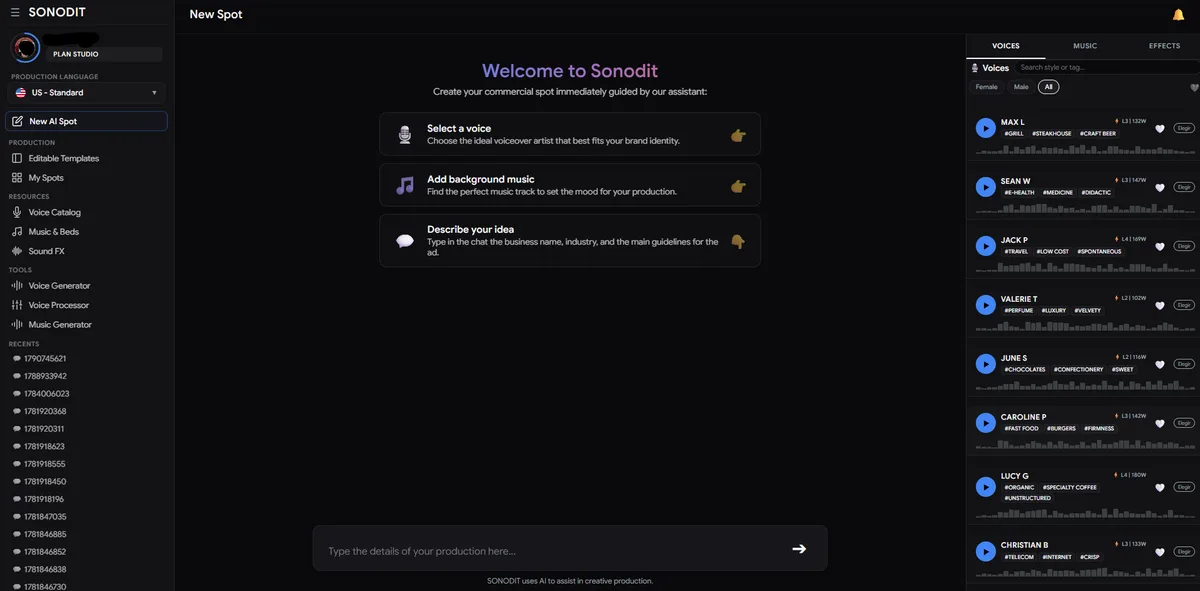
Step 1: Start Your Project
Log in to your regional SONODIT dashboard. Navigate to the left-hand sidebar menu and click on New AI Spot to open the production interface.
Step 2: Input Your Spot Details
In the text box provided, enter the essential details for your commercial. Be sure to include:
- Brand or Store Name
- Physical Address
- Desired Duration
- Special Offers or Key Selling Points
Step 3: Customize Voice and Music
Move to the right-hand column to access the customization menu. Here, you can browse and select the Voice Talent that best fits your brand's personality, then choose a background track from the Music Library. Click Submit to proceed.
Step 4: Refine and Finalize
The AI will automatically generate a script for you to review. Once confirmed, the system may ask for clarification on specific word pronunciations. Simply select the preferred option or type the word phonetically. Click Submit & Record to start the rendering process.
Step 5: Download Your Commercial
Wait approximately two minutes while our engine processes your audio. Once finished, your production will be ready for instant download directly from your dashboard.
Smart Radio Studio
Producí spots de radio profesionales en minutos con inteligencia artificial.